
Emergency Management
For Emergency Operations Centres and Emergency Coordination Centres: the Units in the field and where they are, the Incidents on the map, Tasks, Sitreps and the full record of the event. On the screens in the centre, on the web site and on the phones in the field, with the same system Search and Rescue has used since 2006.
An Emergency Management Operation
Start the Operation as Emergency Management, and SARTrack speaks the language of the response: in every window, on the web site and in the App.
- Units instead of Teams, and Incidents instead of Clues, each Incident with its place on the map, details and photos.
- The managing Units (ICP, EOC, ECC, NCC and IMT) send Tasks and Manager Sitreps; field Units send LOCSTAT and SITREP.
- Units of every kind: field teams, hubs, welfare centres, fire trucks, ambulances, police, aircraft and vessels.
- Personnel, Equipment and Operation Periods, for the handover in an event that lasts for days.
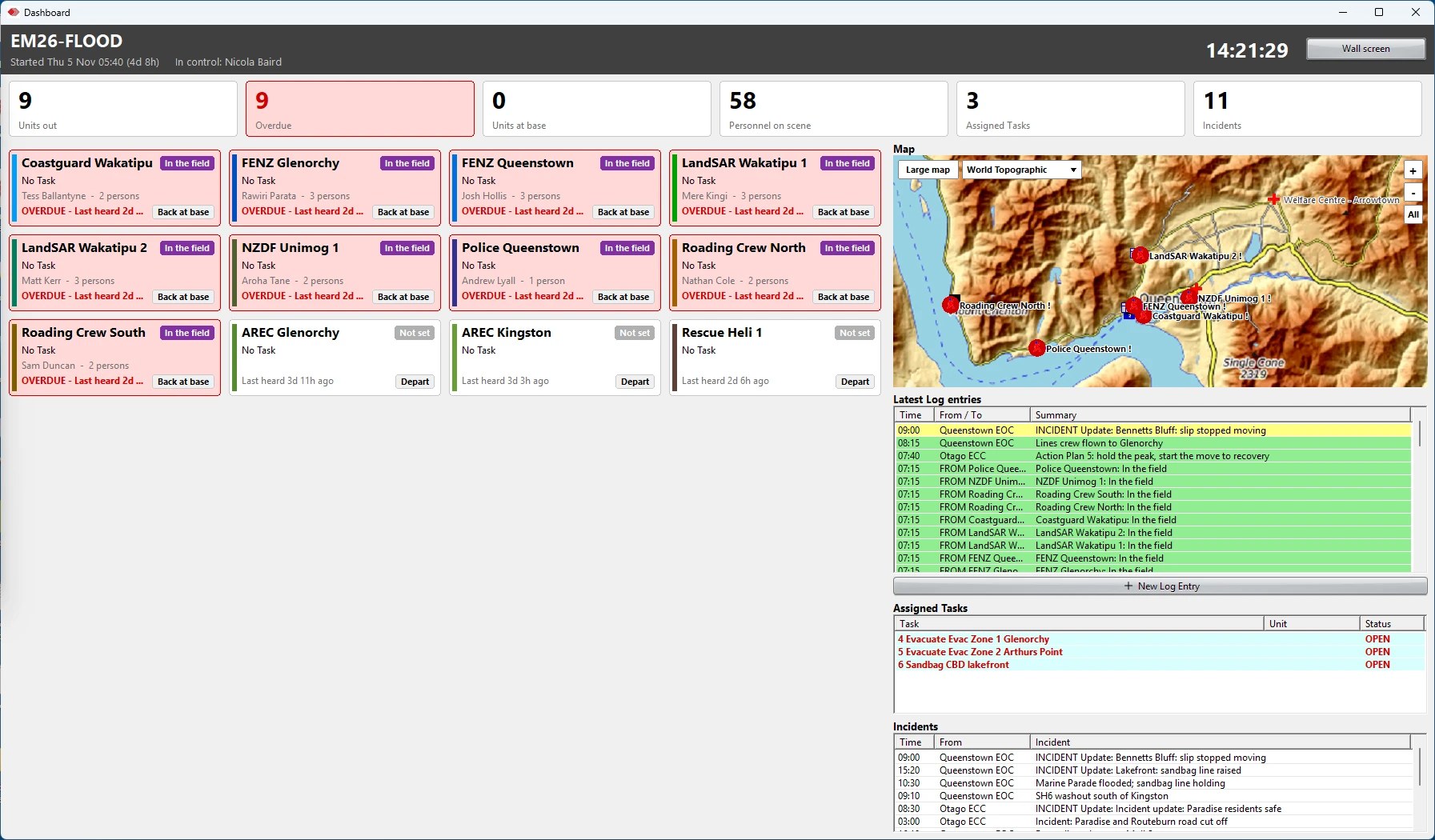
- The Dashboard: the whole event in one window, also for a wall screen.
Several operators, one Log
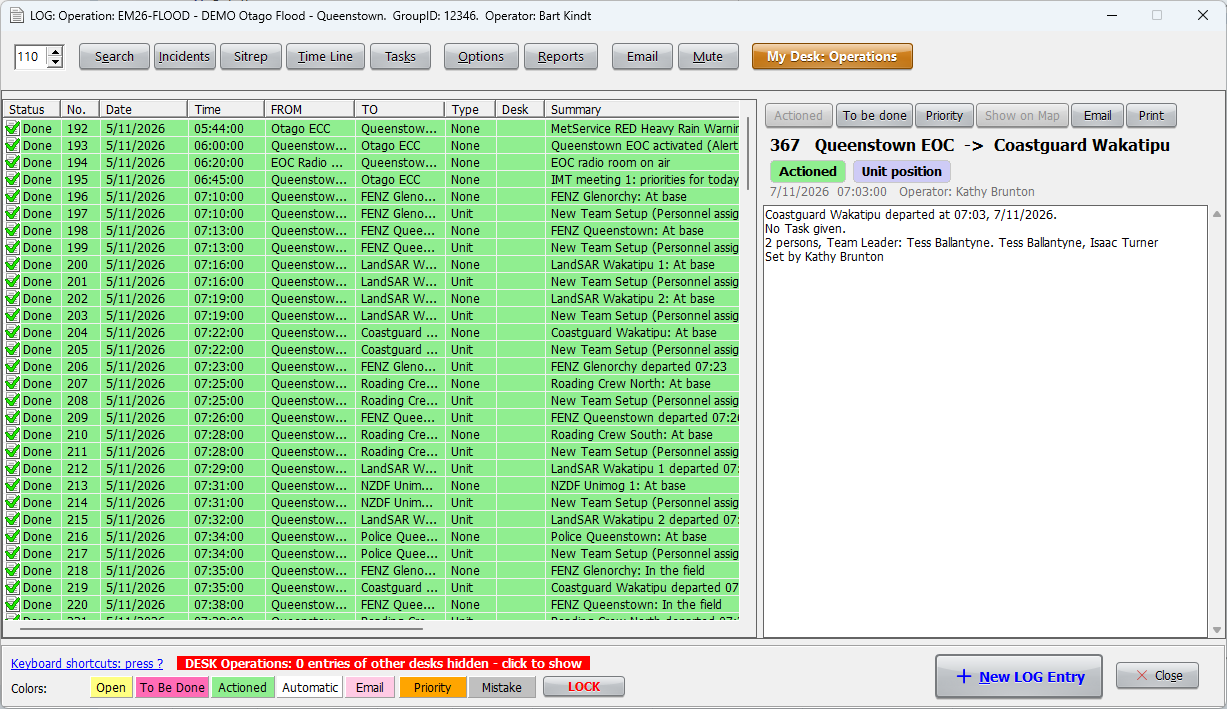
- Every operator works at a desk. My Desk sets which stations and Units the desk takes, or a radio channel.
- Incoming traffic goes to the right desk. An operator takes an entry, and the others see who has it; an entry not dealt with within 10 minutes turns red.
- An operator who logs off hands back their entries at once; a terminal that drops off, after 2 minutes. Nothing is left without an owner.
- The web site shows the desks too, with reports per desk and per terminal.
Functions, in your own framework
- Each Log entry can be tagged with the function it belongs to: Intelligence, Planning, Operations, Logistics, Welfare, Public Information and the others.
- Named as your country's framework names them: CIMS in New Zealand, AIIMS in Australia, and ICS elsewhere.
- Reports per function on the web site.
Every Unit accounted for
- A check-in schedule per Unit: the Dashboard shows a check-in that is due, and one that was missed.
- "Last heard" counts every message from a station, not only its position.
- A contact card per Unit: the contact person, phone, satellite phone, Starlink or other internet, and notes.
E-mail with the ECC
- A Log entry can be e-mailed to a Unit's address, for example the ECC's, straight from the Log entry window.
- E-mails from a Unit's address come into the Log as a message from that Unit, ready for a desk to take. This can be switched off in SARTrack's Setup.
- Winlink messages too: see EMCOMM.
When the network is down
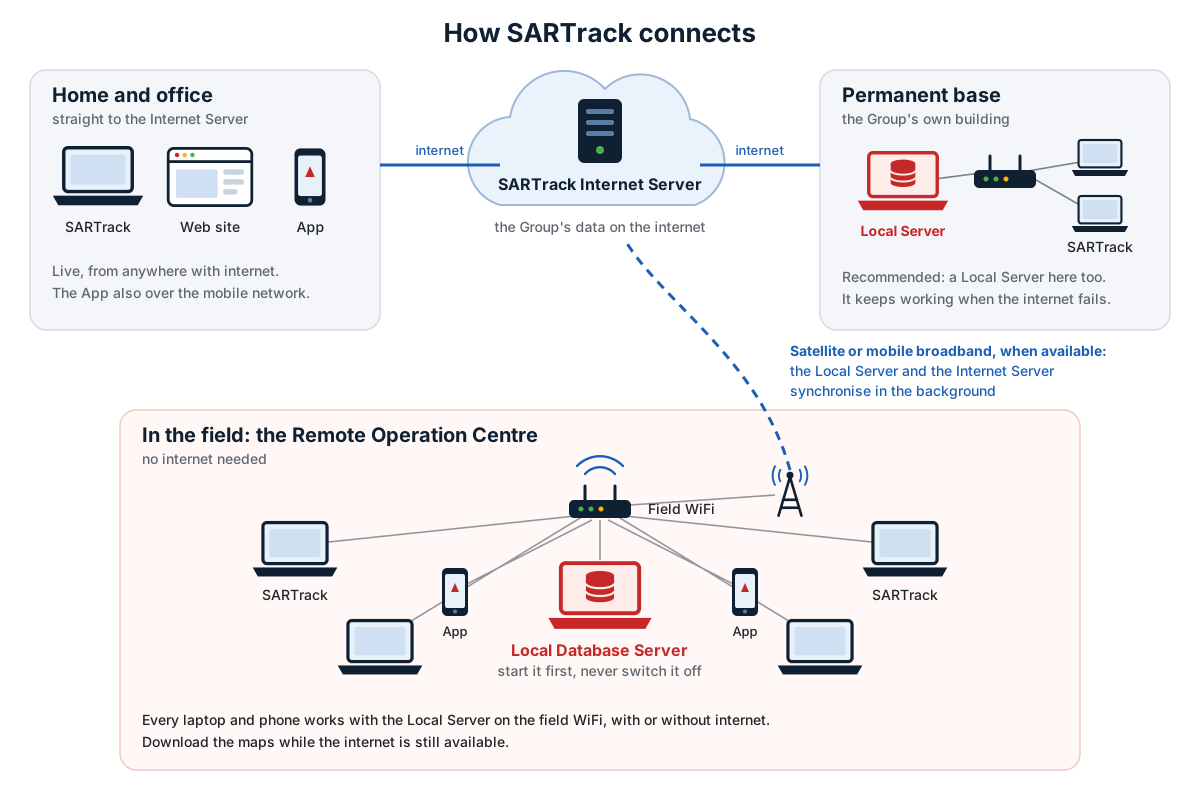
- A local Database Server on a laptop and a WiFi router: every laptop and App at the centre stays in sync, without internet.
- When the internet comes back, the local Server catches up with the Internet Server, and the event is on the web site again.
- The web site gives a Controller or a partner agency the map, the Log and the Sitreps in a browser.
- A share link shows the live map and the Sitreps to people without a login: with a PIN, for a set number of days, withdrawn at any time, and every opening logged.
SARTrack for your centre?
Try it free for 3 months on one of our Internet Servers, or tell us what your centre needs.